
Table of Contents
- Installation of XCP-ng 8.3
- Xen Orchestra from Sources
- Finish Building Pool
- Networks, Storage, and Users
- Update XCP-ng Hosts
- Backups and Snapshots
- Creating a VM
- and Beyond…
Introduction:
On the chance that you are new here…
Hi. My name is Matthew McDougall. Sometimes I go by Matt. Sometimes I like hearing my name in different accents. There is no rhyme or reason for how or when. Use either, but bonus points if you ask.
Professionally, I have well over a decade of experience in IT wearing many different hats. My LinkedIn is at the top, if you are curious. What are relevant here are my several years of experience building and maintaining XCP-ng+Xen Orchestra environments, both professionally and personally, as well as providing official support and training.
Join me as I walk you through rebuilding my personal virtualization environment, that was designed as a scaled-down version of production virtualization environment that I built only a few years ago. Obviously, it’s not a great idea to publicly document that environment, so instead of providing hypotheticals that will probably work I am providing a real-world example that can be replicated and scaled up, as necessary.
Quick note: This tutorial is written with the intent to show how to replicate in another homelab environment, and hopefully provide enough insight to help scale for use in a professional production environment. Considering this, it is not written in a typical structured documentation format, there may be segments with less focus than others, and some topics that may be omitted entirely. It is also not intended to replace the supplant the voices of others speaking about XCP-ng (namely Tom Lawrence, as mentioned below). I am simply writing this from my perspective and experience as another voice in the conversation, where hopefully someone else may find this useful and help move the conversation forward. Please refer to the official up-to-date documentation as a supplement, or to entirely disregard this tutorial. I will not be offended!
Additionally, this tutorial is current as of the original publish date of 2026-03-10. Both XCP-ng and Xen Orchestra are constantly being updated with new features and compatibilities. Xen Orchestra v6 is a key focus of updates, but not of this tutorial. I am quite confident that the broad strokes approach of this tutorial will give a very solid foundation to anyone for some time to come. If you run into any problems along the way, the official community forums and Discord server will be the best places to start. There is even a chance I am around to help!
Acknowledgements:
My journey with XCP-ng and Xen Orchestra began when looking around for a replacement for ESXi, a few years before the Broadcom acquisition, when I happened upon Tom Lawrence’s earliest videos on the topic. He has created many more fantastic videos since for this and other IT-related topics, and he has compiled all of his XCP-ng and Xen Orchestra videos into a playlist. Thank you, Tom!
Thank you to the XCP-ng and Xen Orchestra team members who continue to be an active resource in the community.
Mike is a feckless coward. I could not be more disappointed in you.
L’éléphant dans la pièce:
Let me be completely honest here: I know hardware is expensive right now, whether it’s from the DRAM cartel, the AI money Ouroboros, US politics, scalpers buying up what is out there, or the regular folks trying to grab whatever else is left. Please do not take this tutorial as a suggestion that any of it needs to be done right now, although I will touch on some ideas and strategies further below that may help. By the time costs settle back down, this information may be out of date. However, I do not think it will be radically so.
Why any of this?
For me, I guess it could be about the freedom to tinker and experiment. Sure, it is partly about taking back some level of control from big tech. I mean, nothing is completely open and free in computing, whether it’s the hardware or the software (even open source) that has to conform on some level. Even open hardware requires trust in the engineers, and open source requires requires trust in the developers. That’s just true of anything. If absolute trust is absolutely required, I suppose there’s always homesteading. Then is there enough trust in one’s self for even that?
I guess what I am trying to get at is that, for me at least, for the past few years XCP-ng+XO hits similar notes of joy, curiosity, and freedom that I got from building a few Gentoo Linux systems in the mid-2000s. Looking closer, it would be hard to explain how the two are even related. Twenty years is a long time, and a lot of things have happened since. There are also probably plenty of other things that could have been that, but time, place, and happenstance.
Why? It may simply be about reclaiming and holding on to the joy of computing for as long as I can or until I have no mouth. (h/t Harlan Ellison)
The why may be important on a personal, emotional level, but for everything else there are the what and the how…
Well, what is virtualization?
“Virtualization is a series of technologies that allows dividing of physical computing resources into a series of virtual machines, operating systems, processes or containers.” – Wikipedia
Essentially this…
For a deeper dive, check out my post Matt’s Take: What is Virtualization?
For those who are new to virtualization: Where server operating systems used to be installed directly on bare metal servers, virtualization allows many server operating systems to be installed alongside each other over what is called a hypervisor. The hypervisor is the bridge between physical hardware resources and virtualized software needs. Hypervisor OSes like XCP-ng discussed here open up additional levels of flexibility and freedom, where a relatively high level of care needed to be taken with bare metal OSes. That same level of care can be present, but along with it comes a reduced TOC from less hardware, available redundancy, backups, and simply the peace of mind that if/when something breaks that it is far more trivial to restore and remediate.
What about XCP-ng?
XCP-ng is a cohesive, community-backed, free and open source Xen hypervisor distribution, able to be installed on a vast majority of x86 bare-metal servers (and x86 commodity hardware). Initially created in response to Citrix and their shifting focus of XenServer further away from the community, XCP-ng exists as a downstream fork of XenServer.
Contrast this to KVM, which is provided by Linux kernel modules. Where Linux is at the core of a Linux distribution, XCP-ng is a Xen distribution because it is at the core. XCP-ng does utilize a Linux distribution within the privileged Dom0 to serve as a bridge between the less privileged DomU(s) (VMs) and Xen (and the hardware).
With the Broadcom acquisition of VMware, it serves as an attractive alternative to ESXi well-suited for production environments.
Xen Orchestra
While XCP-ng is perfectly capable of functioning on its own, and management is completely doable (if not entirely tedious with scale) if you are handy with the command line, more commonly management is accomplished by browser-based or native applications. These include things like Xen Orchestra (browser-based), XCP-ng Center (Windows-only), and XenAdminQt (MacOS and Linux, currently in alpha). While some do prefer using native programs, my focus here will be entirely on Xen Orchestra. Also, Xen Orchestra is the only one I would recommend for production use since you can support packages are available for purchase.
Xen Orchestra can handle the vast majority of XCP-ng management tasks, and among many other things also has a built-in backup engine that can export to local network attached storage and/or cloud storage. The backup feature is included with non-free tiers of XOA (with professional support), and with XO from sources (without support).
XCP-ng+XO in the Homelab? Why not Proxmox?
One of the biggest reasons I choose XCP-ng+XO over Proxmox has to do with the core philosophies of each. XCP-ng is intended to be something of an ephemeral hypervisor appliance where very little (preferably zero) modification is done to the host itself. When deployed among several identical hosts, this makes redeployment and scaling up next to trivial. On the other hand, Proxmox presents a Linux distribution with a KVM focus, but can also do containers. Host modifications are also not discouraged. This makes redeployment of the host OS very much non-trivial.
Both are approaching the hypervisor from very different angles, and both have their audiences. Proxmox is obviously well-suited in the homelab with the level of convenience that it brings with just a single host. I will not lie and say that deploying XCP-ng+XO in a homelab is not a bit more involved, but in my opinion the work is worth the effort. This tutorial is intended to simplify how to build a three host pool with shared storage in a homelab, but can be even more simply applied to a single host with local storage, or even used as inspiration when scaled up for a production environment.
All of that is a much more recent and reasoned analysis compared to several years ago when I tasked myself with finding a replacement for ESXi. My experience with virtualization being much lower, XCP-ng and Xen Orchestra simply seemed to provide a much more analogous replacement for how ESXi was being used, while also being open source and coupled with difficult to parse software license agreements. Proxmox is also very good, but it is a different hypervisor approach that did not seem to align with what I needed at the time. The lack of a backup solution at the time also did not help.
My Methodology:
The next several sections are basically copied from my fluxnet GitHub repository. Since that repository is updated out of step with this tutorial, I can make no guarantees this will be 100% accurate and current. That being said, it does reflect the tutorial as it is written now.
Let’s start by describing the environment and why it was designed this way. In a production environment, it would be ideal to strive for redundancy and fault tolerance at every layer, but that is not always feasible depending on many factors. Redundancy can include multiple physical hosts, dual storage controllers and RAID arrays, firewall HA with CARP, LACP internal network links and redundant switches, redundant carrier links, and so on. The most obvious thing preventing redundancy at every layer is cost. Extra physical hosts, network switches, storage controllers, and so on can raise the design cost of an environment by double, if not more. Another element is simply the added complexity that needs to be mitigated by skilled admins and engineers, both in design, management, and maintenance, which again adds to cost. There is a lot of similarity between the production and the lab environments. Both use a single firewall, a single core/access switch and a single storage switch, among other things. Redundancy at these layers /could/ be built in, but I chose this because of the reduced complexity, simpler management, and they can be easily replaced with minimal downtime. If 99.9999% uptime is not required, there is no point in pulling your hair out over it. Literally all of IT is built up like a house of cards, and the balancing act of knowing where to invest time, effort, and money comes down to experience and a bit of luck.
Could this be accomplished with two hosts instead of three? Certainly. The reason I like three identical hosts instead of just two is that you have one more level of peace of mind. I might be wrong, but I think the most likely core physical element of an environment like these to experience downtime is a physical server, or in this case, virtualization host. We have all seen servers lock up for one reason or another, whether it’s due to failed updates or something else. With just two hosts, literally everything rests on keeping that other host up while troubleshooting the other host. Maybe its as simple as a reboot, but often it is not. With three hosts, there is a lot more flexibility with remaining resources and how troubleshooting is approached, as well as the unlikelihood of a second host going down and making everything rest on a single host just as in the two host scenario.
Keep in mind, when I say to use multiple hosts here, I mean multiple hosts of identical hardware configuration. XCP-ng can certainly support disparate hosts in the same pool, but identical hosts are most ideal. This is most apparent with CPU and networking. With CPU, all hosts must use either AMD or Intel CPUs. No mixing here. However, different generations with the same OEM is possible, with the caveat that the entire pool will be limited to the CPU instruction of the least capable (usually oldest) CPU. For networking, each interface must be named matching the physical links. All of this is far simpler with identical hardware, and also does not need to be considered in the next points.
When virtualization hosts are treated as ephemeral appliances, as I do with XCP-ng, it becomes near trivial to simply reinstall the OS and rejoin the existing pool if troubleshooting seems like it is not worth the time, or if absolutely necessary. Three hosts allow the decision to reinstall to be much less stressful than just two hosts.
Three hosts also means hypervisor-level High Availability is possible, albeit with that aforementioned complexity. HA is not necessary in these environments, but having three hosts is a huge hurdle already crossed in case it ever does become necessary.
Redundant storage controllers in the production environment meant that the virtualization environment stayed operational in the extremely unlikely event that a single controller went down. There was only one time in the nearly five years of running this TrueNAS appliance that one of the controllers was down for longer than a few short moments due to a failed update, and the remaining controller was just fine the whole time waiting to apply the update until the first controller was good again. It was one of the few times I needed to call on support. Of course, this is perfect example of why redundancy is so important, not to mention a solid level of support for anything in production.
Res Ipsa Loquitur:
Example Production Environment:
Hosts:
| Host(s) | 3x Dell PowerEdge R450 |
| CPU | Intel Xeon Silver 4316 / 20c40t |
| RAM | 256GB |
| Storage | Mirrored NVMe boot disk |
| Network 1GbE | 4x 1GbE |
| Network 10GbE | 2x 10GbE |
Storage:
| Model | TrueNAS X10 |
| Contr. | 2x redundant X10 controllers, 32GB RAM each, 12 vCPU each |
| HDD | 9x TrueNAS SAS 7200RPM in RAID1+0 with hot spare (43.2TB usable) |
| Read Accelerator | 400GB SAS SSD |
| Write Accelerator | 16GB SAS SSD |
| Network 1GbE | 2x 1GbE (per controller) |
| Network 10GbE | 2x 10GbE (per controller) |
Network:
| Access/Core | Unifi USW-Pro-24 |
| Storage | Unifi USW-Pro-Aggregation |
| Link Media | Copper preferred. CAT6 for 1GbE, DAC for 10GbE, fiber for carrier links |
Lab Environment:
Hosts:
| Host(s) | 3x Lenovo M720q |
| CPU | Intel Core i7-8700t / 6c12t |
| RAM | 32GB |
| Storage | 120GB+ NVMe |
| Network 1GbE | 1x 1GbE |
| Network 10GbE | 2x 10GbE (10Gtek [Intel 82599ES Controller]) |
Storage:
| Model | QNAP TS-873 |
| CPU | AMD RX-421ND / 4c4t |
| RAM | 16GB |
| HDD | 8x 16TB in RAID6 (87.26TB usable) |
| SSD | 2x 2TB in RAID0 (1.76TB usable) |
| Network 1GbE | 4x 1GbE |
| Network 10GbE | 2x 10GbE |
Network:
| Access/Core | Unifi USW 24 PoE |
| Storage | Unifi USW Aggregation |
| Link Media | Copper preferred. CAT6 for 1GbE, DAC for 10GbE |
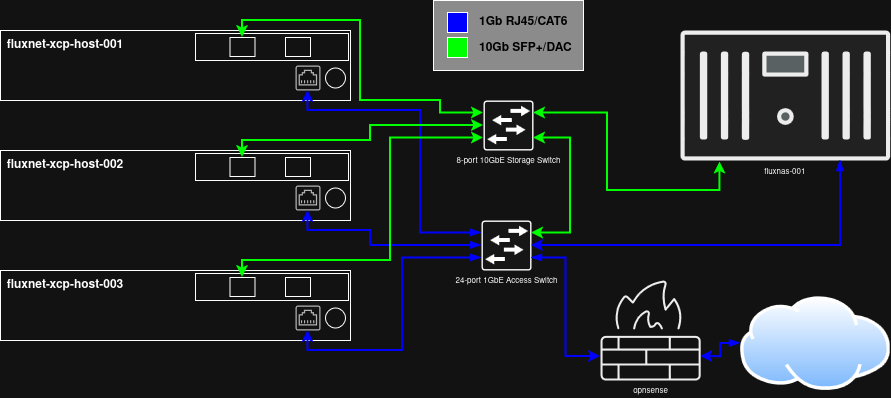
Topology:
Subnets:
My approach to subnetting here will absolutely not be applicable to many, if not even most, environments. This started when I took over production infrastructure that included several locations, each using their own flat /24 subnet. These looked like 192.168.A.B, where A was the site, and B for the hosts/devices. Unsurprisingly, the two subnets with the most devices would quite often run out of available IP addresses. What do the hosts at each location look like? Are they user PCs/laptops, cell phones, voip phones, servers, network equipment, etc.? With subnet math, there are often many ways to address this. Since I was the only one managing the infrastructure, including just about every aspect of it, I chose to walk what I think is the simplest, most efficient, and most logical path.
The first thing was to plan the VLANs/subnets. Despite having 65535 available, I wanted to stay between 1-254 (which should be apparent below), and I chose to use 100-200 initially because they are easier to distinguish visually when displayed in a list. Initially, I had planned ten VLANs (100, 110, 120, etc.) for things like primary data, VoIP, management, servers, and a few others. In practice, I think I only ended up using a handful of them. A key thing here is VLAN consistency at each location. Each VLAN/subnet was also its own /24. Even with just the handful that were used consistently, that segmented the network enough that there may not ever be another shortage of IP addresses.
It really is as simple as this: 10.A.B.C
- A = Site number
- B = VLAN
- C = Host
With my home network, the site number was no longer important. I still stayed with a very similar schema, because…. futureproofing? I did not need the same number of VLANs, but the core ideas are there.
Tips for buying hardware:
For any IT professionals reading this, I would recommend sticking with your existing vendors before going with used hardware for any production uses. I probably don’t need to mention that, but I felt like it needed to be said before I go any further.
The idea to use these 1L Lenovo Tiny PCs as hosts started with Project TinyMiniMicro from ServeTheHome. Ignoring costs, while a rack mount server may be more capable, that same server is also going to be much louder, much hotter, and use much more electricity even when idle. Used older rack mount servers can often be purchased relatively inexpensively, often because they would otherwise be destined for e-waste. They might also have had much of their internal components removed, which is typically going to be more expensive than consumer hardware.
These 1L Lenovo Tiny PCs (as well as Dell Minis and HP Micros) go through similar supply chains. They’re built at scale for business use.They just first go to workstations, instead of data centers and server closets. They are perfectly fine for small scale workloads, and the ability to find identical models with reasonable ease makes them ideal for small scale virtualization. These often also have at least one m.2 2280 NVMe slot that I currently use as the XCP-ng boot disk, as well as a 2.5″ 6Gb/s SATA SSD that obscures a PCI-E slot just below. In my hosts, I have replaced the SATA SSD with 10GbE network cards. Check the links below if you are at all curious:
Lenovo Thinkcentre/ThinkStation Tiny (Project TinyMiniMicro) Reference Thread
Tiny/Mini/Micro PC experiences
Considering the state of things right now, my advice would be to start small. Possibly a single host, local storage, etc. What will help a lot is to try to pick a model that fits the current needs, as well as can be purchased again later to build out a pool of identical hosts. I have a few eBay alerts set up just for my particular model of choice. RAM and storage is a bit more tricky, especially if buying new. camelcamelcamel can help watch price changes on Amazon wish lists, and visualping can watch for visual changes on any website.
Of course, there’s always that old PC in the closet or e-waste from work, which /might/ even include slightly older 1L TinyMiniMicro PCs!
Prerequisites:
Aside from one or more hosts, the following are either required or simply suggestions depending on your environment:
- Existing physical network with switch ports directly connected to hosts configured to allow tags for all necessary VLANs to be used with XCP-ng+XO.
- Network Attached Storage with preconfigured NFS exports, SMB shares, and/or iSCSI LUNs. Disregard if only using a single host with local storage.